
TL;DR:
- Organize travel plans by geographic zones instead of activity types to reduce transit time and increase efficiency.
- Limit daily activities to two or three priorities plus unscheduled time, allowing flexibility and depth.
- Utilize digital tools like AI itinerary builders, Google Maps, and Notion for fast, adaptable, and centralized planning.
Scheduling travel activities efficiently is the single most effective way to see more, spend less time in transit, and return home without feeling like you need another vacation. The core principle behind smart itinerary planning is geographic grouping: organizing each day around a specific neighborhood or zone rather than a list of unrelated attractions. Grouping activities by zone cuts transit time by 30 to 50%, which translates directly into more time doing things you actually came to do. Tools like Google Maps, Notion, and Destlist make this process faster and more precise than ever before.
How to schedule travel activities by grouping locations
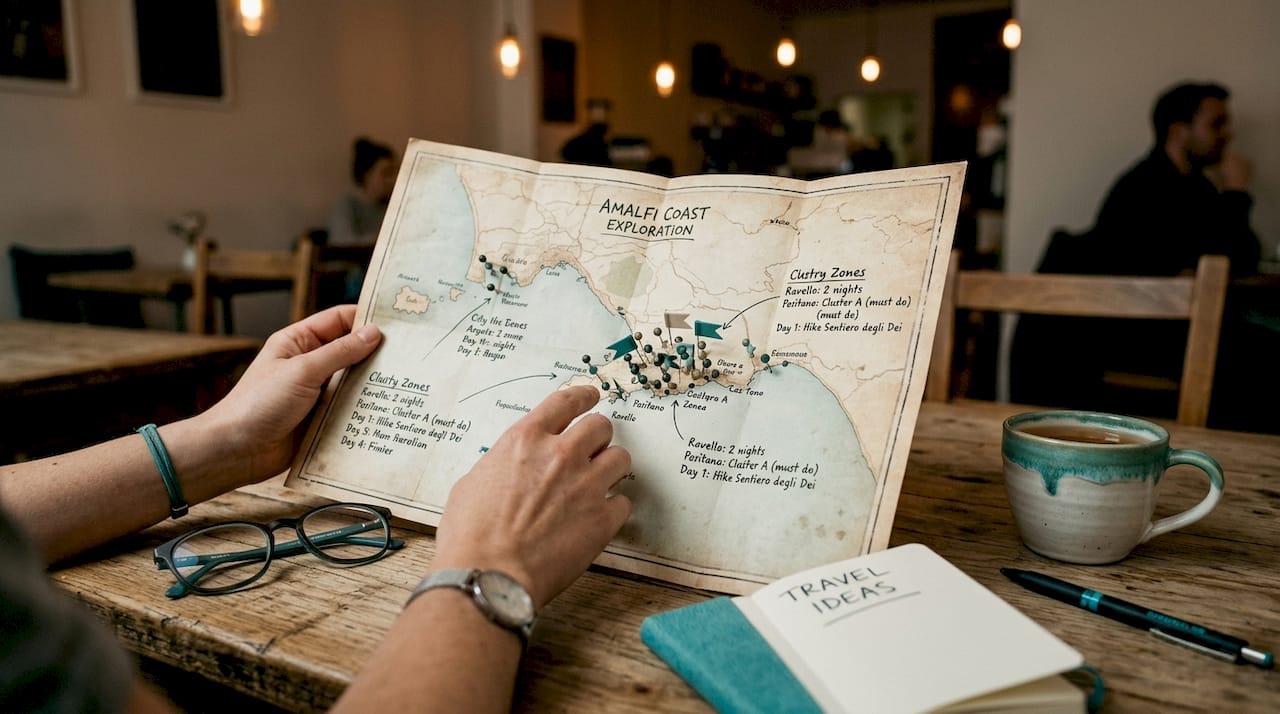
The most powerful scheduling move you can make is to stop planning by activity type and start planning by geography. Visiting a museum in the morning, a market across town at noon, and a viewpoint back near the museum at sunset is a common mistake that burns hours in taxis and subways. Instead, assign each day to a specific district or zone and fill it with everything that zone has to offer.
Here is how to apply this in practice:
- Open Google Maps and drop pins on every attraction, restaurant, and experience you want to include.
- Look for natural clusters. Three or four pins sitting close together become your "Day 1 zone."
- Create a custom map in Google Maps using color-coded layers: one color per day or neighborhood.
- Assign each cluster to a day, then sequence activities within that cluster by walking distance.
- Leave the cross-city moves for travel days when you are already moving between hotels or airports.
Zone-based scheduling also protects you when one activity runs long. If the Uffizi Gallery in Florence takes three hours instead of two, you are still in the same neighborhood. You simply shift to the next nearby stop rather than scrambling across the city.
Pro Tip: Start with a broad city map view and identify two or three major zones before you research individual attractions. This prevents you from falling in love with an activity that sits 45 minutes from everything else on your list.
What is the right number of activities per day?
The industry standard for a balanced travel day is 2 to 3 priority activities plus one or two minor ones, with at least two hours left unscheduled. That unscheduled time is not wasted. It is where the best travel moments happen: the bakery you stumble into, the street musician worth stopping for, the extra hour at a site that moved you more than expected.
Overpacking a day creates a specific kind of misery called decision fatigue. When you have eight things on a list and you are already tired at 3 p.m., every remaining item feels like a chore. A flexible framework reduces that cognitive load by giving you a calm structure rather than a rigid script.
Follow this sequence to build a balanced daily load:
- Identify your two or three non-negotiable highlights for the day. These are the things you would genuinely regret missing.
- Add one or two minor activities nearby, things that are nice but skippable if time runs short.
- Block two hours as intentionally free. Write "free time" on the schedule so it feels deliberate, not accidental.
- On trips longer than five days, designate one full slow day per five days of travel. Use it for markets, cafes, and wandering without a list.
- Alternate high-energy days (hiking, theme parks, museum marathons) with lower-intensity days (neighborhoods, food tours, beaches).
Buffer days on extended trips prevent the burnout that turns a two-week trip into a two-week endurance test. Travelers who skip buffer days consistently report exhaustion by day eight or nine, regardless of how much they were looking forward to the trip.
Pro Tip: Rate each planned activity as high, medium, or low energy before you finalize the day. If you have three high-energy items in a row, swap one for something slower. Your future self will thank you.
What are the best digital tools for organizing travel plans?
The right tools turn a chaotic spreadsheet into a living, editable document you can share, update, and access offline. Here is how the most useful options compare:
| Tool | Best for | Key strength |
|---|---|---|
| Google Maps custom maps | Geographic clustering | Visual pin grouping with color-coded layers |
| Notion or Google Sheets | Master destination database | Centralizes links, notes, hours, and costs |
| Destlist | Full itinerary generation | AI builds day-by-day plans with mapped routes in minutes |
| TripIt | Organizing confirmations | Auto-imports flight and hotel emails into a timeline |
Centralizing all travel data in one hub dramatically reduces the chaos of switching between browser tabs, email threads, and paper notes. A Notion database, for example, lets you store attraction hours, booking links, admission prices, and neighborhood tags in one searchable place.
The biggest leap in efficiency comes from AI itinerary builders. AI tools generate personalized day-to-day travel plans in roughly two minutes based on your destination, travel dates, and preferences. That initial draft handles the structural work so you can focus on refining rather than building from scratch. Destlist takes this further by combining AI generation with human editorial review, producing itineraries that include mapped routes, estimated walking times, and weather alerts. You can explore AI-powered itinerary tips to understand how much of the planning process can now be automated without losing personalization.
The key advantage of digital tools over paper or static PDFs is quick editing. When a museum closes unexpectedly or a restaurant is fully booked, you update one cell or card and the whole plan adjusts. Sharing access with travel companions also eliminates the "what are we doing tomorrow?" conversation at 10 p.m.
How to build a balanced travel itinerary step by step
A well-structured itinerary has three layers. Fixed anchors, preferred activities, and backup options work together to give you structure without rigidity. Here is the full build process:
Step 1: Lock in your fixed anchors. Flights, accommodations, pre-booked tours, and timed-entry tickets go on the schedule first. These are immovable. Everything else fits around them.
Step 2: Map your destination and identify zones. Before adding a single activity, drop pins on your accommodations and the top ten attractions you want to visit. Let the geography tell you how many zones exist and roughly how many days each needs.
Step 3: Assign zones to days. Match each cluster of pins to a specific day. If your hotel sits in Zone A, start with Zone A on day one so you can orient yourself without a long commute.
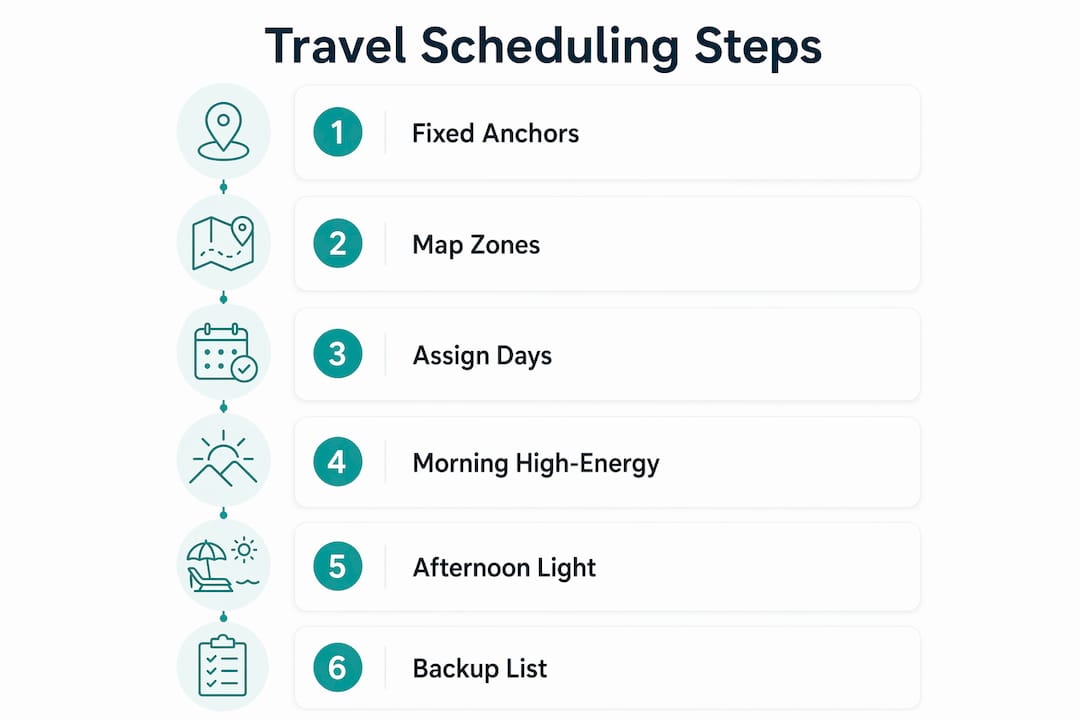
Step 4: Schedule high-energy activities in the morning. Museums, hikes, and busy markets are best tackled before 1 p.m. when energy and crowds are more manageable. Pre-booking a local walking tour on your first day orients you to the city and cuts backtracking for the rest of the trip.
Step 5: Fill afternoons with lighter activities. Neighborhoods, cafes, viewpoints, and shopping work well after lunch when energy dips naturally.
Step 6: Build your backup list. Store five to ten alternative activities in a digital note accessible offline. These are your contingency options for rain, closures, or low-energy days. Offline backup lists are one of the most underused tools in travel planning. Most travelers only discover their value after a plan falls apart.
A sample day structure for a city trip looks like this:
| Time block | Activity type | Example |
|---|---|---|
| 9:00 a.m. to 12:00 p.m. | Priority activity (high energy) | Major museum or guided tour |
| 12:00 p.m. to 1:30 p.m. | Lunch in the same zone | Local restaurant near the museum |
| 1:30 p.m. to 4:00 p.m. | Secondary activity (moderate) | Neighborhood walk or market |
| 4:00 p.m. to 6:00 p.m. | Free buffer time | Spontaneous exploration or rest |
| 6:00 p.m. onward | Evening activity or dinner | Pre-booked restaurant or show |
For a deeper look at how to build this kind of schedule efficiently, the itinerary planning workflow guide covers how to save ten or more hours per trip using structured planning phases.
How to adapt your schedule when things go wrong
No itinerary survives contact with reality completely intact. Delays, energy crashes, and unexpected closures are not failures. They are normal travel variables that a well-built schedule absorbs without drama.
The key mindset shift is treating your itinerary as a calm framework rather than a strict script. Avoiding hour-by-hour scheduling and using zone-based anchor points instead gives you the flexibility to adjust without feeling like the whole day has collapsed.
Here is how to troubleshoot common disruptions:
- Delays or overruns: Drop the lowest-priority item from the day, not the highest. Your must-sees stay protected.
- Energy crash: Swap an afternoon activity for the free buffer time you already built in. This is exactly what that block is for.
- Weather changes: Pull from your offline backup list. Indoor alternatives should already be tagged by zone so you can substitute without replanning from scratch.
- Unexpected closure: Check Google Maps for the next nearest attraction in the same zone. You are already there.
Pro Tip: Identify one "anchor point" per day, a fixed activity that everything else orbits. If the day goes sideways, you still hit the anchor. Everything else is a bonus.
Re-anchoring after a disruption is simpler than most travelers expect. Return to your zone, check what is still open or available nearby, and continue from there. The step-by-step trip planning approach works precisely because it builds this kind of resilience into the structure from the start.
Key takeaways
Efficient travel scheduling comes down to one principle: organize by geography first, then layer in energy management and flexibility to protect both your time and your enjoyment.
| Point | Details |
|---|---|
| Group by zone, not type | Clustering activities by neighborhood cuts transit time by 30 to 50%. |
| Cap daily activities | Stick to 2 to 3 priorities plus 2 hours of unscheduled time to avoid burnout. |
| Use digital tools | Google Maps, Notion, and Destlist centralize planning and allow fast edits. |
| Build in three layers | Fixed anchors, preferred activities, and backup options create adaptable itineraries. |
| Adapt without panic | Drop lowest-priority items first and use your backup list when plans change. |
Why I stopped planning trips by the hour
I spent years building itineraries that looked impressive on paper and felt exhausting in practice. Fifteen-minute buffers between sites, color-coded time blocks, spreadsheets with formulas calculating transit minutes. The result was a schedule that turned every travel day into a project management exercise.
The shift that changed everything was geographic clustering. On a trip to Lisbon, I stopped assigning times and started assigning zones. Alfama on Tuesday. Belém on Wednesday. LX Factory and the waterfront on Thursday. Within each zone, I had a rough sequence but no clock. That trip felt like the first one in years where I actually relaxed.
The second shift was accepting that two or three great experiences per day beats six rushed ones. I used to feel guilty about "wasting" a travel day by spending three hours at one site. Now I recognize that depth beats breadth almost every time. The travelers I know who come home most satisfied are the ones who lingered, not the ones who checked off the most boxes.
Technology genuinely helps here, but only when you use it as a starting point rather than a final answer. AI tools like those built into Destlist produce solid structural drafts in minutes. The human refinement step, where you adjust for your own pace and preferences, is what makes the difference between a generic plan and one that actually fits how you travel.
The best itinerary you will ever build is one you feel comfortable ignoring when something better comes along.
— Helen
Let Destlist build your next itinerary
Planning a trip takes real time, and most of that time goes into the structural work: researching zones, sequencing activities, matching hotels to neighborhoods, and building in the right amount of flexibility. Destlist handles all of that for you.
Destlist combines AI-powered itinerary generation with human editorial review to produce custom travel itineraries that include day-by-day activity plans, mapped routes, estimated walking times, and weather alerts. You get a ready-to-book trip within 24 hours, built around your preferences and budget. Whether you are planning a city break or a multi-week adventure, you can browse curated destination plans to see exactly what a well-structured itinerary looks like before you commit.
FAQ
How many activities should I plan per travel day?
The standard is 2 to 3 priority activities plus one or two minor ones, with at least two hours left unscheduled. This balance prevents exhaustion and leaves room for spontaneous discoveries.
What is the fastest way to organize a trip itinerary?
AI itinerary builders generate personalized day-by-day plans in roughly two minutes. Starting with an AI draft and refining it manually saves hours compared to building from scratch.
Why should I group travel activities by neighborhood?
Geographic clustering reduces transit time by 30 to 50%. It also protects your schedule when one activity runs long, since your next stop is already nearby.
How do I handle itinerary disruptions while traveling?
Drop the lowest-priority item from the day first, then pull from your offline backup list for alternatives. Using zone-based anchor points rather than rigid timestamps makes adjustments far less stressful.
Do I need a digital tool to plan travel activities?
Digital tools are not required, but they make editing, sharing, and accessing your plan offline significantly easier. Options like Google Maps custom maps and Notion work well for most travelers, while platforms like Destlist automate the entire structure.