Turn off data roaming or switch to airplane mode the moment you land, then rely on Wi-Fi or a pre-bought eSIM for everything else. That single habit stops the majority of accidental charges before they start.
Here's the fast version of what to do at arrival, before you even read the rest of this guide:
- Switch off data roaming, or use airplane mode with Wi-Fi turned back on.
- Connect to Wi-Fi whenever it's available, at the airport, hotel, or café.
- Buy an eSIM or local SIM ahead of time if you'll need data away from Wi-Fi.
- Only consider a carrier travel pass if you're hopping through several countries in a few days.
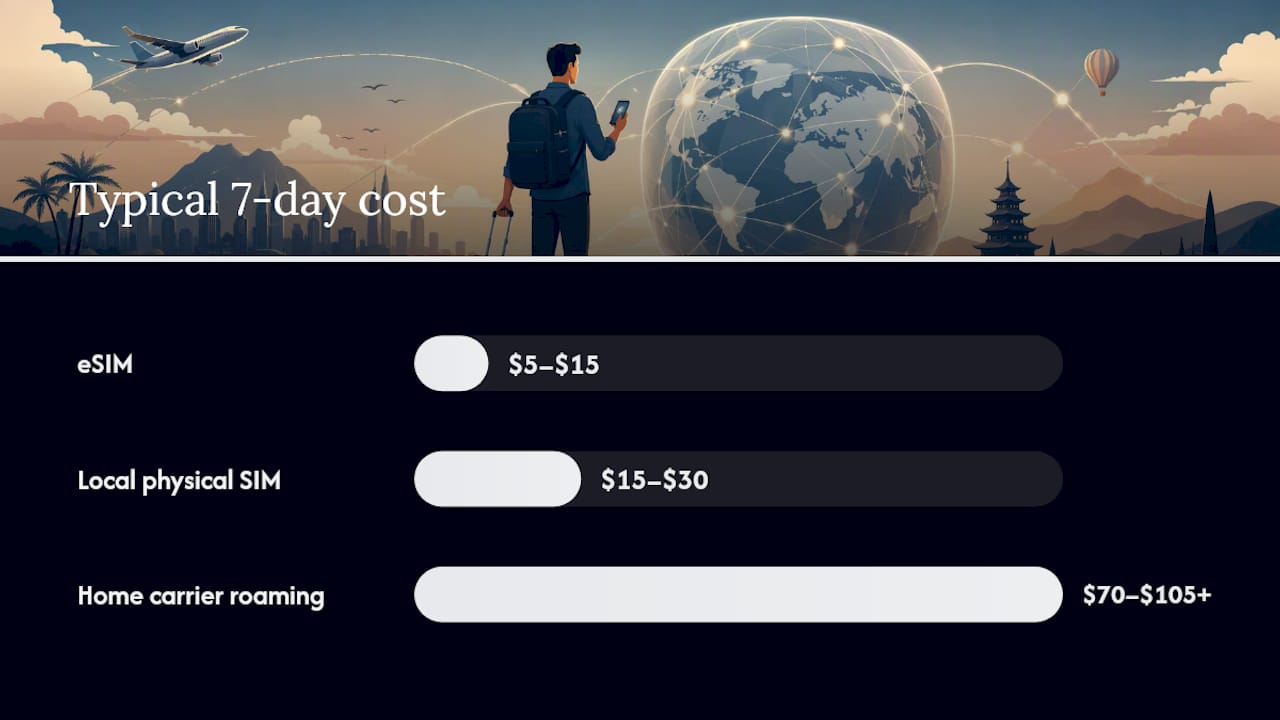
The money math is not subtle. A week of roaming on your home carrier for around 5GB typically runs $70 to $105 or more, while a local physical SIM covers the same usage for $15 to $30, and an eSIM often comes in even lower. The rest of this guide covers the exact phone settings to change, every connectivity alternative worth considering, a pre-trip checklist, what to do if you still get hit with a bill, and the high-risk situations, like cruise ships and border towns, that catch even careful travelers off guard.
Key Takeaways
Avoiding roaming charges comes down to disabling automatic cellular use, buying a pre-activated eSIM or local SIM, and monitoring usage before a small oversight becomes an expensive bill.
| Point | Details |
|---|---|
| Kill background switching | Turn off data roaming, Wi-Fi Assist, and background app refresh before you leave home Wi-Fi. |
| Compare real costs | A week of roaming can cost $70 to $105+, versus $15 to $30 for a local SIM or $5 to $15 for an eSIM. |
| Buy connectivity ahead of time | Activate an eSIM before departure so you land ready to go instead of hunting for a kiosk. |
| Watch for billing lag | Roaming charges can appear on a bill weeks after your trip, so check statements for a cycle or two after you return. |
| Plan connectivity like an itinerary item | DestList's custom trip plans build offline map prompts and connectivity recommendations into each day of your trip. |
Table of Contents
- Avoid Roaming Charges by Fixing These Phone Settings First
- The Best Ways to Avoid Roaming: eSIMs, Local SIMs, and Alternatives
- Your Pre-Departure Checklist to Prevent Roaming Fees
- Monitoring Usage and Fixing an Unexpected Roaming Charge
- Situations That Cause Surprise Roaming Bills
- Building Connectivity Into Your Itinerary
- Sources
Avoid Roaming Charges by Fixing These Phone Settings First
Your phone is set up to protect its connection, not your wallet. That's the root of most surprise bills: your device will happily swap to a cellular network the instant Wi-Fi looks shaky, and it won't ask permission first.
Here's what to check on both platforms before you land:
- Turn off data roaming. On iPhone, go to Settings > Cellular > Cellular Data Options > Data Roaming, and switch it off. On Android, it's Settings > Network & Internet > SIM cards > Roaming.
- Decide on airplane mode versus selective settings. Airplane mode kills everything, including voice and SMS, so it's the safest default. If you need to receive calls or texts on your home number, leave airplane mode off and disable data roaming only.
- Disable Wi-Fi Assist (iPhone) or Adaptive Connectivity (Android). These features quietly switch to cellular data when Wi-Fi is slow, which is exactly the kind of background switch that generates a bill you didn't see coming.
- Turn off background app refresh and automatic app updates. Go to Settings > General > Background App Refresh on iPhone, or Settings > Apps on Android, and disable refresh for anything you don't need running constantly.
- Review individual app cellular permissions. Streaming apps, cloud backup, and social media are the worst offenders for silent data use.
- If you have a dual-SIM or eSIM setup, assign data manually. Keep your home number active for calls if you want it, but route the cellular data line to your local eSIM so nothing touches your home plan.
To confirm you're actually protected, pull down your notification shade or check your status bar. If you see a foreign carrier name where your home network usually shows, or a roaming icon, data roaming is still live somewhere.
Pro Tip: Background app refresh and Wi-Fi Assist are the two settings travelers forget most often, and they're also the ones most likely to rack up cellular data charges the moment your hotel Wi-Fi drops for a few seconds.
The Best Ways to Avoid Roaming: eSIMs, Local SIMs, and Alternatives
There's no single right answer here. The right connectivity alternative depends on trip length, how many countries you're visiting, and whether you're traveling solo or with a group that needs to share data.
eSIMs are digital SIM profiles you buy and activate through an app before you even leave home. No kiosk line, no swapping a physical card, and pricing is upfront. eSIMs are widely considered the cheapest and most convenient option for trips of a few days to a few weeks, and activation takes minutes once you land, sometimes before you even leave the plane.
Local physical SIMs make more sense for longer stays or when you're bringing multiple devices that each need a separate line. You'll need an unlocked phone, and you'll need to physically find a shop or kiosk, which eats into your first day.
Carrier travel passes, the daily or weekly add-ons your home carrier sells, are the convenience option. You keep your existing number and settings with zero configuration. They're worth the premium mainly on short, multi-country trips where buying a new SIM in each place isn't practical.
Portable hotspots and rental devices are the move for groups. One device, split five ways, often beats five separate phone plans, and it's a safety net when local Wi-Fi is unreliable.
Public Wi-Fi doesn't trigger roaming charges at all, since Wi-Fi traffic runs on the venue's broadband instead of your carrier's cellular network. It's fine for maps, messaging, and browsing. Skip banking or anything sensitive on an open network unless you're running a VPN.
| Option | Typical 7-day cost (~5GB) | Best for |
|---|---|---|
| Home carrier roaming | $70 to $105+ | Backup only, rarely worth it |
| Local physical SIM | $15 to $30 | Long stays, multiple devices |
| eSIM | $5 to $15 | Short to medium trips, quick activation |
| Carrier travel pass | Varies by carrier | Multi-country trips over a few days |
For a deeper look at trading cost against convenience across an entire itinerary, this guide to balancing travel convenience and cost walks through the tradeoffs in more detail. If reliability matters more to you than price, that same convenience-first logic shows up in how business travelers weigh connectivity options when a dropped connection actually costs them something.
Your Pre-Departure Checklist to Prevent Roaming Fees
Do this on your home Wi-Fi, not at the gate.
- Download offline maps, translation packs, and any shows or podcasts you'll want without a connection.
- Update every app and back up your photos while you still have fast, free Wi-Fi. Waiting until you land means those updates happen on someone else's cellular bill.
- Confirm your phone is unlocked if you plan to use a local SIM. Carrier-locked phones can't accept another network's card.
- Buy and activate your eSIM, or research local SIM options, before departure.
- Log into your carrier's app and check its actual international rates and any travel pass options.
- Set data usage warnings and spending caps if your carrier offers them.
- Save your carrier's international support number and screenshot your plan details in case you need to reference them later.
A quick pass through map-based travel planning before you leave makes this whole process faster, since your offline maps and route details are already sorted before you touch a boarding pass.
Monitoring Usage and Fixing an Unexpected Roaming Charge
Prevention only gets you so far. Check your actual usage a few times during the trip, not just before you leave.
- Use your carrier's app or your phone's built-in data counter to track usage daily on longer trips.
- Set a hard data limit in your phone settings so data simply stops working once you hit it, rather than trusting yourself to remember.
- Turn on Low Data Mode, or disable cellular access for data-heavy apps individually, especially video and cloud backup.
- If you do get charged, act fast: note the date, time, and any network name your phone displayed, then call your carrier directly.
Carriers frequently offer a goodwill credit for first-time or accidental roaming charges, especially if you can show you had roaming settings disabled or were genuinely unaware a network switch occurred. Get a case number for any dispute, and if the carrier won't budge, you can escalate to their formal complaints process or file with the FCC.
Pro Tip: Don't panic if a charge doesn't show up until weeks after you're home. International roaming charges often process with a delay, so keep checking your bill for a cycle or two after you return, and hang onto any screenshots of roaming notifications as evidence if you need to dispute something.
Situations That Cause Surprise Roaming Bills
Three scenarios trip up even careful travelers.
- Cruise ships. Maritime cellular networks route through satellite systems and carry some of the steepest roaming rates in the industry. Keep your phone in airplane mode at sea and use the ship's Wi-Fi package instead. If you're prepping for a cruise, planning ahead for port costs applies just as much to connectivity as it does to excursions.
- Border towns. Your phone can quietly latch onto a neighboring country's tower without you ever crossing a border, especially in dense border cities. Manually selecting your network, rather than letting your phone auto-select, prevents this.
- Remote resorts and islands. Wi-Fi can be slow, limited, or nonexistent, and satellite-based data is expensive where it's even offered. Budget for reduced connectivity rather than assuming you'll find a signal.
Building Connectivity Into Your Itinerary
Connectivity shouldn't be an afterthought you handle at the airport. It's a planning decision, the same as booking a hotel or picking a flight.
- Slot your connectivity choice into the itinerary itself: arrival day usually means airport or hotel Wi-Fi, transit days need mobile data, and remote days need a backup plan.
- Pre-buying an eSIM makes sense whenever you'll be moving between places without guaranteed Wi-Fi; leaning on hotel Wi-Fi works fine if you're based in one spot for most of the trip.
- Assign a rough data budget to each day of the trip, and build in a backup like a portable hotspot rental or a local SIM pickup point in case your primary plan runs out.
These same budget-conscious travel habits apply directly to connectivity spending, not just flights and hotels.
A Quick Note on Getting This Wrong Once
I once relied on a hotel's "reliable" Wi-Fi in a small coastal town, only to find it dropped every evening right when I needed to confirm a reservation. My phone quietly grabbed a local tower instead, and I didn't catch it until I checked my usage a day later. The lesson: never treat Wi-Fi as guaranteed. A cheap backup eSIM sitting unused in your phone costs you nothing until the moment you actually need it.
How DestList Builds Connectivity Into Your Trip Plan
DestList treats connectivity as part of the itinerary, not an afterthought you figure out at baggage claim. Every custom plan includes offline map prompts for each day, notes on where Wi-Fi is reliable versus where it isn't, and links to eSIM and connectivity vendors so you're not scrambling to research this yourself the week before you fly.

If you'd rather have a travel planner map out your arrival day, transit days, and remote stretches, along with flights, hotels, and daily routes, DestList's curated travel plans do that work for you within 24 hours. For a fully personalized version built around your exact dates and destinations, start with a custom travel itinerary and get a plan that already accounts for how you'll stay connected.
Sources
- What is Data Roaming? A Guide to Managing Cellular Data Usage | T-Mobile
- Cheapest Way to Get Data Internationally: A 2026 Guide | Cellesim
- Does Using WiFi Count as Roaming? - Roamless