
TL;DR:
- Trip mapping plots travel destinations on a map to optimize routes and reduce transit time. It enhances trip efficiency by revealing geographic clusters and eliminating backtracking. Most travelers should start with the map before finalizing their itinerary to save time and create a more flexible experience.
Trip mapping is defined as the practice of plotting your travel itinerary on a geographic map to organize stops, optimize routes, and improve your overall trip experience. The standard industry term is "route mapping," though trip mapping has become the widely used phrase among travel planners and enthusiasts. This technique applies to everything from a weekend road trip with three stops to a three-week international itinerary crossing multiple countries and transport modes. Trip mapping serves two roles at once: strategic planning before you leave home, and real-time navigation once you're on the ground. Platforms like Destlist build this capability directly into their itinerary services, giving travelers a visual framework that makes complex plans manageable.
What is trip mapping and how does it work?
Trip mapping visualizes travel itineraries on digital or physical maps to outline efficient routes and coordinate multi-stop travel plans. The core mechanic is simple: you input your destinations, and the map reveals the geographic logic of your trip. That visual layer exposes problems a list-based itinerary never would, like a Tuesday that has you crossing the city four times for no reason.
The shift from list-based to map-based travel planning allows travelers to manage complex constraints such as opening hours, budgets, and preferences simultaneously. A list tells you what to do. A map tells you whether doing it in that order makes any sense. That distinction is where trip mapping earns its value.
At its most basic, trip mapping works in three steps. You plot your destinations, you examine the geographic relationships between them, and you reorder or adjust stops to reduce wasted transit time. The result is an itinerary that flows with the geography of a place rather than fighting it.
What technologies and tools enable effective trip mapping today?
Modern trip mapping runs on a combination of digital mapping platforms, AI-driven optimization, and real-time data feeds. Each layer adds a capability that manual planning simply cannot match.
The core tools and features travelers rely on include:
- Interactive multi-stop route planners that let you drag and drop stops to reorder them visually
- AI-assisted itinerary parsing, which reads your list of destinations and suggests the most logical sequence
- Real-time traffic and transit data that adjusts route recommendations based on current conditions
- Multi-modal transport visualization, where trip mapping tools support flights, trains, driving, biking, and walking segments with distinct icons and colored route lines
- Offline map caching so your plan stays accessible in areas with poor cellular coverage
- Sync across devices so your travel companions see the same live itinerary you do
AI-driven route optimization and real-time traffic data integration have reduced the environmental impact of travel and improved convenience for planners. Routing systems can now calculate complex point-to-point paths in under 200ms, which means the map updates almost instantly as you adjust your plan. That speed makes experimentation practical. You can test five different stop sequences in the time it used to take to redraw a route by hand.
Modern trip mapping also integrates AI reasoning to verify the logistical soundness of an itinerary and align it with user preferences dynamically. This goes beyond static route plotting. The AI checks whether your plan is physically achievable given transit times, opening hours, and your stated priorities. Destlist applies this kind of AI-assisted logic to every itinerary it builds, then layers in human curation to catch what algorithms miss.
Pro Tip: Before your trip, use the AI-assisted itinerary feature to run your plan through a logic check. If the system flags a segment as unrealistic, trust it. Travelers who ignore those warnings consistently report the most stressful days.
How does trip mapping improve travel efficiency and experience?
Trip mapping eliminates inefficient zig-zagging itineraries, maximizing time spent at destinations rather than in transit. That single benefit reshapes an entire trip. A day that previously lost two hours to unnecessary crosstown travel suddenly has room for a long lunch or an unplanned museum visit.
The practical efficiency gains stack up across several dimensions:
- Cluster-based daily planning. Grouping geographically close stops into the same day cuts transit time and reduces decision fatigue.
- Backtracking elimination. Seeing your route on a map makes it obvious when you're doubling back. Fixing it takes seconds.
- Balanced itinerary flow. A visual map shows when one day is overloaded and another is thin, so you can redistribute activities before you arrive.
- Group coordination. Sharing digital trip maps allows travel companions to coordinate effectively and maintain consistent itinerary views across devices.
- Reduced travel fatigue. Less time in transit means more energy for the experiences you planned the trip around.
The benefits of trip mapping extend beyond logistics. Travelers who plan with maps report feeling more confident and less reactive during their trips. When you know the geographic shape of your day, unexpected changes are easier to absorb. You can swap a closed attraction for a nearby alternative without unraveling the whole schedule.
Pro Tip: After you build your initial map, look at each day's route as a shape. If it looks like a tangled line rather than a rough loop or arc, you have a backtracking problem worth fixing before you leave.
What are best practices and common pitfalls in trip mapping?
Effective trip mapping follows a clear set of habits. Skipping any of them is where most travelers lose the benefit of the method.
Best practices to follow:
- Plot must-see locations first. Mapping your priority stops before adding secondary ones reveals geographic clusters and can reduce transit time by 20–30%. This is the single most underused tactic among casual planners.
- Use the map as your primary planning tool, not an afterthought. Travelers who build the map first and fill in details second make better sequencing decisions from the start.
- Leave 30–40% of each day unplanned. Industry pros recommend this buffer to prevent itinerary burnout. A fully scheduled day has no room for the unexpected discoveries that often become trip highlights.
- Download offline maps before you travel. Travelers should cache necessary map regions at least 24 hours before departure to maintain navigation access in areas with poor connectivity.
- Revise your map regularly. New information, weather changes, and updated preferences all warrant a route review. A trip map is a living document, not a finished product.
Common pitfalls to avoid:
- Over-mapping every hour of the day, which creates rigidity and stress
- Ignoring transport mode differences, such as treating a 2-mile walk the same as a 2-mile drive in a congested city center
- Failing to sync the map across all devices in your travel group, which leads to version confusion on the ground
- Building a map without checking opening hours, which can invalidate an entire day's sequence
For multi-stop vacation planning, the map-first approach pays the biggest dividends. The more stops you have, the more a visual layout exposes inefficiencies that a written list conceals.
How do you create and optimize a trip map step by step?
Building a trip map from scratch follows a repeatable process. Each step builds on the last, and skipping ahead creates problems you'll have to fix later.
Step 1: Define your trip goals and duration. Decide what kind of experience you want before you add a single pin. A food-focused trip in a single city maps very differently from a multi-country cultural tour.

Step 2: Add all must-see stops first. Drop every high-priority destination onto the map before you add anything else. The geographic pattern that emerges tells you how to group your days.
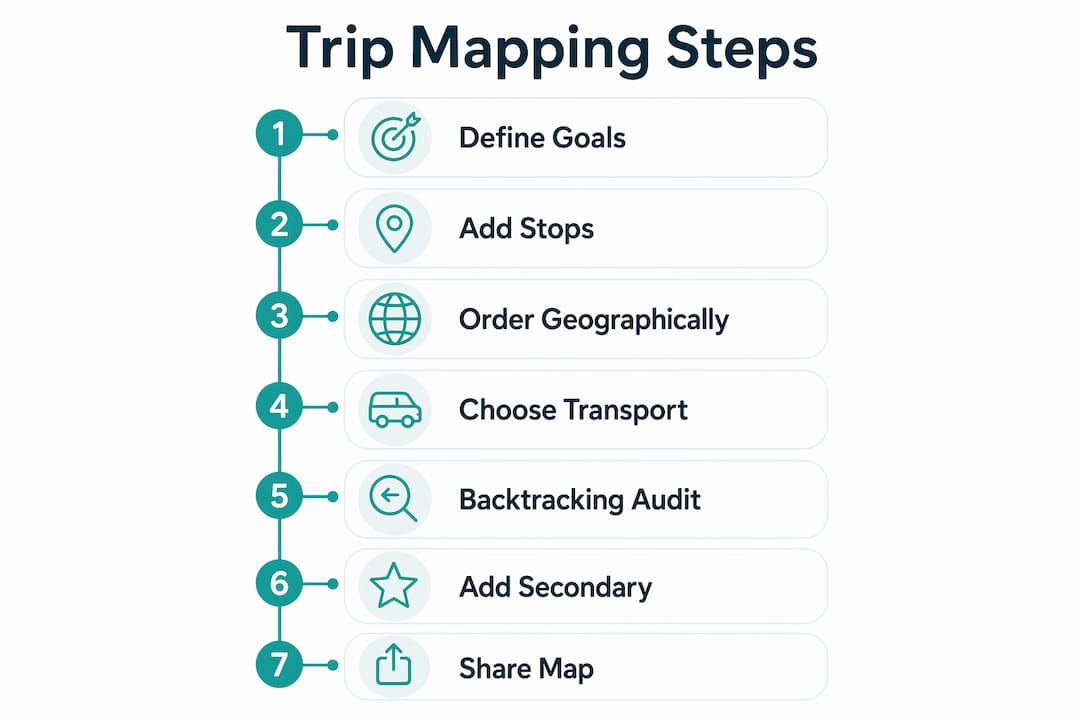
Step 3: Order stops geographically, not chronologically. Resist the urge to plan day-by-day from the start. Let the map show you which stops belong together based on location, then assign them to days.
Step 4: Select the right transport mode for each segment. A 10-mile segment by car and a 10-mile segment by train have completely different time and logistics profiles. Tailor each itinerary segment to the transport reality of that leg.
Step 5: Run a backtracking audit. Look at each day's route and identify any segment where you're retracing ground. Reorder or swap stops to eliminate it.
Step 6: Add secondary stops to fill gaps. Once the primary sequence is clean, add restaurants, rest stops, and secondary attractions in locations that fit the existing route logic.
Step 7: Share the map with your travel group. Maps can be saved, synced, and shared via simple links with real-time updates, so every traveler in your group sees the same current version.
| Step | Action | Key outcome |
|---|---|---|
| 1 | Define goals and duration | Sets the planning framework |
| 2 | Plot must-see stops first | Reveals geographic clusters |
| 3 | Order by geography | Eliminates day-level backtracking |
| 4 | Assign transport modes | Produces accurate time estimates |
| 5 | Audit for backtracking | Reduces wasted transit time |
| 6 | Add secondary stops | Fills gaps without disrupting flow |
| 7 | Share with travel group | Keeps everyone on the same plan |
For travelers who want expert guidance on AI-assisted itinerary building, the step-by-step process above maps directly onto how modern platforms generate and refine routes. Understanding the logic helps you get more out of any tool you use.
Healthy eating while traveling also fits into this framework. When your route is logical and your days aren't overloaded, you have time to find good food rather than grabbing whatever is closest. Resources like eating well on holiday show how a well-planned itinerary creates space for better choices throughout the day.
Key Takeaways
Trip mapping is the most direct method for turning a list of destinations into a travel plan that actually works geographically.
| Point | Details |
|---|---|
| Start with must-see stops | Plot priorities first to reveal geographic clusters before adding secondary stops. |
| Use AI-assisted tools | AI routing checks logistical soundness and adapts routes to your preferences in real time. |
| Leave buffer time | Keep 30–40% of each day unplanned to avoid burnout and allow for spontaneous discoveries. |
| Download offline maps | Cache map regions at least 24 hours before departure to stay navigable without cell service. |
| Share maps with your group | Synced digital maps keep all travel companions on the same current version of the plan. |
Why I think most travelers use trip mapping too late
Most travelers treat the map as a finishing step. They build a list, assign days, book hotels, and then drop everything onto a map to see how it looks. By that point, the itinerary is already locked in, and the map just confirms the inefficiencies they've already committed to.
The travelers I've seen get the most out of trip mapping start with the map blank and add nothing until they've looked at the geography of their destination. That discipline changes everything. You stop thinking in terms of "what do I want to do on Tuesday" and start thinking in terms of "what part of the city makes sense on Tuesday given where I am on Monday night." That shift in framing is where the real time savings come from.
I've also noticed that travelers resist leaving unscheduled time because it feels like wasted planning. The opposite is true. The best travel experiences I've heard about consistently happen in the gaps. A fully mapped, fully scheduled day is a day with no room for the city to surprise you.
The AI tools available now are genuinely good at the logistics layer. They catch backtracking, flag unrealistic transit times, and suggest reordering that a human planner would miss. But they don't know what you actually care about. Use the AI to get the route right, then personalize the stops to match your real interests. That combination, machine logic plus human judgment, produces the best itineraries.
— Helen
Destlist builds the map so you don't have to
Trip mapping takes real time to do well, and most travelers don't have hours to spend auditing routes and reordering stops before a vacation.
Destlist handles the full process, from plotting your destinations to building a day-by-day itinerary with logical route flow, estimated walking times, and curated stops matched to your preferences. Every plan is built with AI and reviewed by human travel curators who catch what algorithms miss. You can browse ready-made curated travel plans or request a custom travel itinerary built around your specific destinations, travel style, and budget. The result is a trip map that's ready to use, not a starting point that still needs hours of refinement.
FAQ
What is trip mapping in travel planning?
Trip mapping is the practice of plotting travel destinations on a geographic map to organize stops, optimize routes, and reduce transit time. It serves as both a pre-trip planning tool and a real-time navigation aid.
How does trip mapping differ from journey mapping?
Trip mapping focuses on geographic route optimization for travel itineraries. Journey mapping is a business tool used to visualize a customer's experience with a product or service. The two terms describe entirely different processes.
What is the biggest benefit of trip mapping?
The primary benefit is eliminating inefficient backtracking, which maximizes time spent at destinations rather than in transit. Plotting must-see stops first can reduce transit time by 20–30%.
Do I need special software to create a trip map?
No specialized software is required. Digital mapping platforms with multi-stop route planners handle the core function. AI-powered travel planning services like Destlist build trip maps as part of a full itinerary service.
Should I download offline maps before traveling?
Travelers should cache the necessary map regions at least 24 hours before departure. Offline maps maintain navigation access in areas with poor or no cellular connectivity.