
TL;DR:
- Personalized travel alerts provide only relevant updates, helping travelers act quickly and confidently. They reduce cognitive load by filtering data through itinerary, location, and preferences, delivering actionable notifications that improve safety and planning. Platforms that accurately source data and offer flexible privacy controls ensure trustworthy, efficient, and stress-free trip management.
Personalized travel alerts give you only the updates that matter, cutting through the noise so you can act fast instead of scrambling. They reduce cognitive load by handling the constant monitoring you would otherwise do yourself, and they keep your itinerary intact when things go sideways. The U.S. Department of State's Smart Traveler Enrollment Program (STEP) has long demonstrated the value of destination-specific advisories: enrolled travelers receive targeted safety alerts and emergency instructions tied to exactly where they are, not generic country-wide broadcasts. Research published in Nature Human Behaviour confirms that personalized warnings increase the probability of action compared to generic ones. That gap between "a storm is coming somewhere" and "your 2 PM flight out of Miami is at risk" is precisely why customized alerts matter.
Table of Contents
- Why personalized travel alerts change how trips actually go
- What types of alerts actually matter on a trip
- How personalization turns raw data into useful signals
- How platforms actually generate these alerts
- How to pick a platform that delivers alerts worth trusting
- Three scenarios where alerts save the trip
- What you need to know about privacy when enabling alerts
- Destlist delivers alerts built into your full itinerary
- Key Takeaways
- The alerts travelers actually trust are the ones that know the trip
- Useful sources and further reading
Why personalized travel alerts change how trips actually go
Generic notifications tell you something happened. Personalized ones tell you what to do about it, right now, for your specific booking.
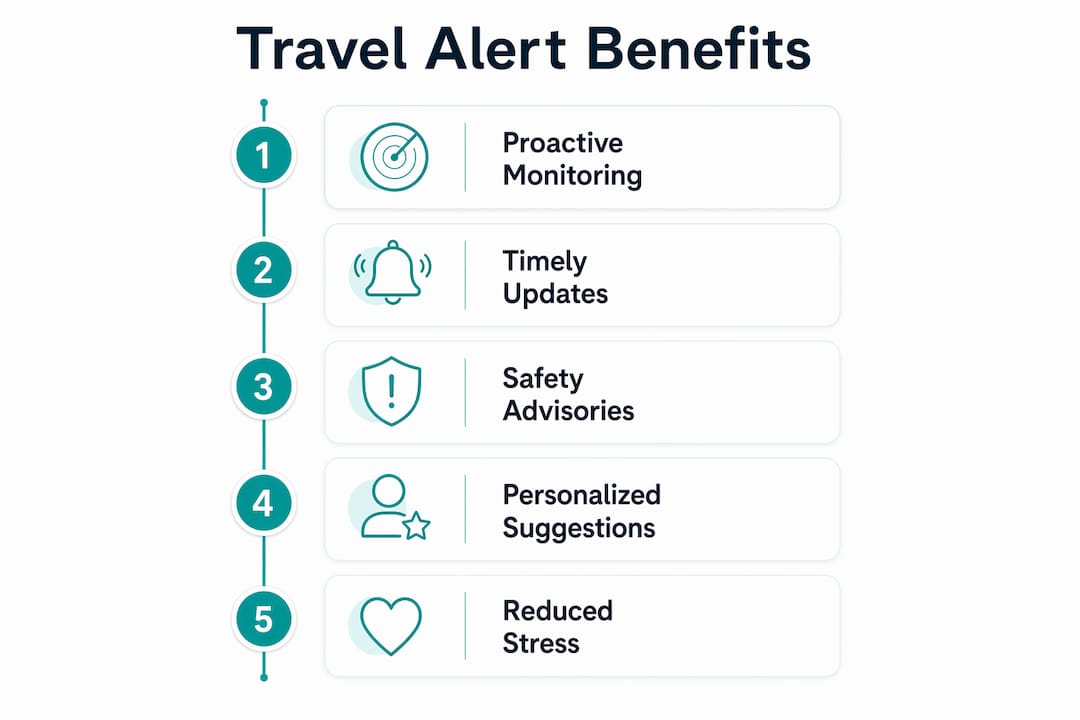
The core benefits map directly to traveler outcomes:
- Fewer manual checks. Automated systems act as a fail-safe, alerting you only when action is needed rather than requiring you to refresh an airline app every 20 minutes.
- Faster rebooking. A flight cancellation alert that arrives 90 minutes before departure gives you time to rebook. The same alert at the gate does not.
- Better local safety awareness. Real-time duty of care alerts proactively manage itinerary changes and reduce the cognitive load of tracking evolving situations abroad.
- Streamlined day plans. When your hotel check-in time shifts or a tour gets rescheduled, an integrated alert updates your day-by-day plan automatically.
The demand for these notifications is measurable. Travelstart's case study with Amadeus found a 50% push notification open rate for flight alerts, and an 11.5% overall attachment rate with 17% for international trips. Travelers are not just tolerating these notifications; they are actively opting in and engaging with them.
| Benefit | Traveler Outcome |
|---|---|
| Proactive flight monitoring | Rebooking window opens before the gate closes |
| Weather feed integration | Route adjustments made before you leave the hotel |
| Safety advisory delivery | Informed decisions without constant news-checking |
| Itinerary sync | Day plan stays accurate after any booking change |
What types of alerts actually matter on a trip
Not every notification deserves your attention at 6 AM. The most useful systems distinguish between alerts that require immediate action and those that are purely informational.
Actionable alerts (require a decision or response):
- Flight cancellations and significant delays. Your flight is canceled; here are two rebooking options.
- Gate changes. Terminal B, Gate 22 is now Gate 7. You have 12 minutes.
- Connection risk warnings. Your layover shrinks to 35 minutes after a delay; your connection probability drops.
- Severe weather advisories. A hurricane watch is active for your destination; here is what to do.
- Safety and security advisories. Civil unrest reported near your hotel district; suggested alternate routes included.
- Visa and entry requirement changes. Entry rules for your destination updated; check requirements before departure.
Informational alerts (useful context, no immediate action needed):
- Minor delays. Your flight is running 15 minutes late.
- Check-in reminders. Online check-in opens in 24 hours.
- Local transport disruptions. Metro line 3 is running on a reduced schedule today.
- Booking confirmations. Your hotel reservation is confirmed; here is the address and check-in time from Wild Foodz by Hotel Entree Brugge.
The distinction matters because alert fatigue is real. A system that treats every boarding time update as urgent will train you to ignore everything, including the alerts that actually need your attention.
How personalization turns raw data into useful signals
The difference between a useful alert and a useless one comes down to context. Personalization filters the same raw data feed through three lenses: your itinerary, your location, and your stated preferences.
Here is how that works in practice:
- Itinerary context. A weather alert for Tokyo is irrelevant if you land in Osaka. A system that knows your confirmed bookings sends only the alerts tied to your actual route.
- Location data. GPS or last-known location lets a platform send a safety advisory for the neighborhood you are in, not the entire city.
- Traveler profile. Preferences like "business travel only" or "family with young children" shift which alerts get priority and which get suppressed.
- Priority thresholds. Good platforms let you set what counts as urgent. A 20-minute delay might not warrant a push notification; a 90-minute delay probably does.
Contextual trip suggestions work the same way: the signal improves when the system knows more about you. Traveler personas capture those preferences upfront so the filtering is accurate from day one.
Pro Tip: Set a "critical only" channel for overnight hours. Route flight cancellations and safety advisories to push notifications; send minor delays and informational updates to email. You sleep better and still catch anything that genuinely needs action.

How platforms actually generate these alerts
The technical flow is simpler than it sounds. Alerts start with your confirmed bookings, run through real-time data feeds, and get filtered by personalization rules before they reach your phone.
Data sources:
- Booking confirmations (parsed from email forwards or direct API connections to airlines and hotels)
- Real-time aviation status APIs (live flight tracking, gate data, delay codes)
- Weather APIs (current conditions, forecasts, severe weather watches)
- Government advisory feeds (STEP, State Department travel advisories)
- Local transport feeds (metro, rail, ferry disruptions)
- Visa and entry requirement databases
Processing and delivery flow:
- Raw data arrives from multiple feeds simultaneously
- The platform parses and enriches it against your confirmed itinerary
- Personalization rules apply (location match, preference filters, priority thresholds)
- Alert is classified as actionable or informational
- Delivered via the appropriate channel: push notification, SMS, email, or in-app message
Platforms that parse booking confirmations automatically extract flight numbers, hotel names, and dates, which means the personalization layer has accurate data to work with from the start. Offline access matters here too: a well-designed app caches your itinerary and recent alerts so you can read them without a data connection, which is exactly when you need them most.
Integrated travel planning connects these alert feeds directly to your day-by-day itinerary, maps, and packing lists, so a single booking change ripples through your entire plan automatically.
How to pick a platform that delivers alerts worth trusting
The evaluation comes down to three axes: accuracy of sources, depth of personalization controls, and clarity of action paths. A platform that sends fast alerts based on bad data is worse than no alerts at all.
Evaluation checklist:
- Source accuracy. Does the platform pull from official airline APIs and government advisory feeds, or does it scrape third-party aggregators?
- Timeliness. How quickly does an alert reach you after a status change? Minutes matter for rebooking.
- Customization depth. Can you set thresholds, quiet hours, and channel preferences per alert type?
- Offline access. Are recent alerts and your itinerary available without a data connection?
- Action paths. Does the alert include a next step (a rebooking link, an alternate route, a contact number)?
- Privacy controls. Can you see what data is collected, limit its scope, and delete it?
Questions to ask any provider:
- Which data sources do you use for flight status and safety advisories?
- How do you prevent alert fatigue? What filtering logic separates actionable from informational updates?
- Where is my booking and location data stored, and for how long?
- What happens if I lose connectivity mid-trip?
Flexible travel planning depends on alerts that give you options, not just information. A cancellation alert without a rebooking path is half an answer.
Three scenarios where alerts save the trip
1. The canceled connection in Chicago A traveler's inbound flight lands 40 minutes late, cutting the connection to under 30 minutes. An alert fires the moment the delay is confirmed, flagging the connection risk and surfacing two alternative routing options. The traveler rebooks from the plane before landing. Outcome: no missed connection, no night in an airport hotel, roughly two hours saved versus waiting to discover the problem at the gate.
2. The last-minute weather diversion in Southeast Asia A tropical storm warning is issued for a coastal destination 18 hours before arrival. Because the platform integrates weather API data with the traveler's itinerary, an alert fires with the advisory, a suggested inland alternative, and a local ferry schedule showing the last viable departure. The traveler adjusts the plan the night before, not at the pier.
- Alert type: severe weather advisory (actionable)
- Outcome: itinerary adjusted before travel day, no stranded scenario
3. The safety advisory abroad Civil unrest is reported near a traveler's hotel in a major city. A STEP-style notification arrives with the specific district affected, a suggested alternate route to the airport, and the nearest embassy contact. The traveler avoids the affected area entirely. Preventing this kind of travel mistake is exactly what proactive safety alerts are designed to do.
What you need to know about privacy when enabling alerts
Useful alerts require personal data. The question is not whether to share it, but whether the platform handles it responsibly.
What platforms typically collect and why:
- Booking confirmations: to parse your itinerary and match alerts to your actual flights and hotels
- Email access (scoped): to extract booking data from confirmation emails
- Location data: to send geo-targeted safety and weather alerts relevant to where you are
- Device tokens: to deliver push notifications to your specific device
Security checklist before you enable alerts:
- Confirm opt-in is explicit, not buried in terms of service
- Check that data is encrypted in transit (HTTPS/TLS)
- Verify you can delete your data and revoke location access at any time
- Look for scope-limited sharing: your booking data should not be sold to advertisers
The U.S. Department of State's STEP program is a useful benchmark here. Enrollment is voluntary, data is used solely for sending advisories and emergency assistance, and travelers control their own profile. Any commercial platform handling your travel data should meet at least that standard of transparency and purpose limitation.
This article is general information, not legal or privacy advice. Review each platform's privacy policy and confirm current data practices directly with the provider for your own situation.
Destlist delivers alerts built into your full itinerary
Busy travelers who want personalized notifications without building their own alert stack get the most from a platform where alerts are part of the itinerary, not bolted on afterward.
Destlist combines AI parsing with human curator review to deliver weather alerts, safety feeds, and itinerary updates as part of every trip plan. The custom travel itinerary service matches your preferences, budget, and travel dates, then builds a ready-to-book plan with day-by-day routes, mapped walking times, and integrated alert triggers. Every plan is ready within 24 hours. Privacy controls, quiet-hours settings, and channel preferences are part of the setup, so you decide what reaches you and when. For travelers who want the full picture before they leave, Destlist's done-for-you planning includes pre-trip advisories alongside the complete itinerary.
Key Takeaways
Personalized travel alerts reduce stress and save time by delivering only the updates tied to your specific itinerary, location, and preferences, with clear action paths when something changes.
| Point | Details |
|---|---|
| Alerts cut cognitive load | Automated monitoring replaces manual status checks, freeing attention for the trip itself. |
| Actionable vs. informational | The best platforms classify alerts by urgency and route them to the right channel at the right time. |
| Personalization requires data | Itinerary, location, and preferences are the three inputs that make alerts relevant rather than noisy. |
| Privacy controls matter | Look for explicit opt-in, encryption in transit, scope-limited sharing, and a data deletion option. |
| Destlist integrates alerts into plans | Every Destlist itinerary includes weather and safety alerts, ready within 24 hours of your request. |
The alerts travelers actually trust are the ones that know the trip
Most alert systems fail not because the data is wrong, but because the context is missing. A flight delay notification that does not know your connection time is just noise. A weather warning for a country you left two days ago is worse than nothing. The platforms worth using are the ones that treat your itinerary as the source of truth and filter everything else through it.
What I have seen working on Destlist itineraries is that the human review layer catches what AI parsing misses: a booking confirmation with an unusual format, a hotel that changed its check-in policy, a local festival that blocks the route we mapped. Alerts built on top of that verified itinerary data are far more reliable than alerts built on a raw email parse. The goal is not more notifications. It is fewer, better ones that you actually act on.
Useful sources and further reading
- U.S. Department of State STEP: The official enrollment page for destination-specific travel advisories and emergency alerts for U.S. travelers abroad. Start here for any international trip.
- Nature Human Behaviour: personalized warnings: Research showing that tailored warnings increase the probability of action compared to generic broadcasts. Useful for understanding why personalization matters beyond convenience.
- Amadeus/Travelstart flight alerts case study: Engagement data on push notification open rates and attachment rates for paid flight notifications. Good for understanding real-world demand.
- Duty of care and real-time alerts: Expert analysis linking proactive alert delivery to duty of care obligations and cognitive load reduction for travelers.
- Automated travel notifications: six benefits: Industry overview of behavioral and emotional benefits, including the fail-safe model for alert-only-when-action-needed systems.
- Weather API integration for personalized alerts: Technical explanation of how weather and location data combine to send contextually relevant notifications.